Wednesday, May 24, 2017
End Of Year Reflection
This semester I learned a lot from my eComm classes. For technology, I learned how to model things in 3D with Maya and other programs. For collaboration, I worked with a few different groups on group projects, which also taught me things in communication. For project management I will take away how to organize files, for assignments and in programs like After Effects. I can use the file management at home and in later years of class. For leadership I've had to direct other people while doing group work, not very often but I've done it. My greatest strength would be my ability to follow directions correctly and my weakness would be that I sometimes forget to turn stuff in so it ends up being late. I have improved in regards to my technical skills with After Effects in making special effects and masking stuff like green screens out. With what I have learned I can make my own videos for my own purposes and do special effects for people. I wouldn't really change anything because I didn't really see any problems this year. To summarize this year of eComm went well and I learned a lot of new skills, both technical and interpersonal.

Wednesday, March 29, 2017
The Plausible Impossible - Mickey Mouse Short
 When Mickey jumps on the stack of cards they come to life and follow him like soldiers. In the cartoon world inanimate objects can move like a living thing. Thus you could make things living by hitting them hard enough. impossible because to be animate a thing must have a brain, which cards do not,
 If Mickey simply pushes on the mirror while standing next to it, he will go through it to another dimension. The laws of physics that define solid objects as solid do not apply to the cartoon world if the characters try to resist it. Impossible because people cannot walk through glass and if you try you will be stopped.
 When Mickey eats a walnut he suddenly grows to massive size and then shrinks way down. In real life people don't suddenly change size but these rules don't apply to cartoon characters. Impossible because people can't grow large amounts instantly and walnuts don't cause large growth or shrinkage.
 In the alternate dimension the chairs and other furniture have faces, voices, and can move like they have human arms and legs. The definition of inanimate objects does not apply to the cartoon world, so they act like humans. Impossible because a chair cannot pet a dog or yell at a mouse.
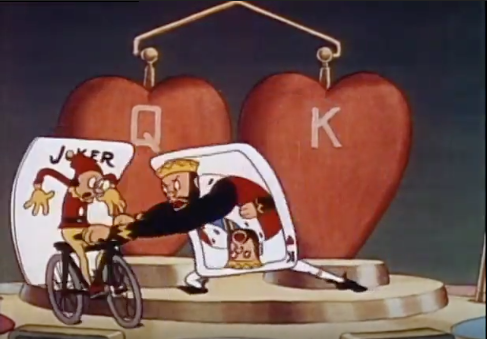 When the King card reaches for the Joker, he is able to pull the bike off the card's surface. In real life paper things like this do not create physical objects of the images they show. The king also later pulls a metal sword from his card. Impossible because paper cannot hold 3D things inside it.
Tuesday, March 21, 2017
Recreated Trailer - Napoleon Dynamite
Assignment
For this assignment we had to recreate a movie trailer, shot-for-shot and edit-for-edit. One rule for choosing a movie was that it had to be set in a school, with the intent that most filming would be done within class hours.Pre-Production
The first step in this project was selecting a movie and we chose Napoleon Dynamite. Next we had to get all the shots from the trailer and put them into a storyboard. Then we decided who would play which characters in the trailer.
Filming
We filmed the shots over about a week and a half of school, and I filmed a bit out of school. While we filmed I also made the transition things with the lockers and did the intro. Almost all the shots used a tripod expect for the ones I filmed because I didn't have one at the time. A difference between the trailer and our video is that in the bike scene is a skateboard in ours. One problem we had in the filming of the video is it is somewhat difficult to make a trailer like this with a group of 2 people.
Editing
The video was edited in Adobe Premiere Pro. One problem I had while editing was that one clip kept losing audio and changing to static randomly, though it fixed itself by the time it was rendered. One of the more complicated editing things I had to do was make the lockers appear in random order for the transitions and make the words fly onto the screen (which also had some problems with bouncing).
Wednesday, February 1, 2017
Music Video - Candyman
For this project we had to make a music video for a song we picked. My group chose the song Candyman by Zedd and Aloe Blacc. The video can be watched here:
First, we had to make a beat sheet and find all the copyright info of the song. Then we made the storyboard, gathered supplies and decided on a location to shoot. We filmed the clips over a few says in the same place. The editing was done in Premiere. In making this video I learned how to make audio fade out and video fade to black, as well as add markers in the timeline. If I could change anything I would make the video clips have audio because it was hard to lip-read to figure out which clips went with which lyrics. I would keep the ending the same because I like how the video/audio fade ended up.
First, we had to make a beat sheet and find all the copyright info of the song. Then we made the storyboard, gathered supplies and decided on a location to shoot. We filmed the clips over a few says in the same place. The editing was done in Premiere. In making this video I learned how to make audio fade out and video fade to black, as well as add markers in the timeline. If I could change anything I would make the video clips have audio because it was hard to lip-read to figure out which clips went with which lyrics. I would keep the ending the same because I like how the video/audio fade ended up.
Monday, December 19, 2016
Portfolio Reflection
Walk Cycle
In this project we had to draw a character, scan them into the computer, and color and animate them. We learned how to make a walk cycle in 2D, and how to edit things in photoshop. I picked this project because I liked the way it turned out and how the walk cycle looks good and doesn't slide. My strengths here are in animating, my weakness is my drawing wasn't very good. I haven't really improved my drawing skills because I rarely need to draw. If I could change something I would make the arms move up and down or wiggle.
Story Animation
For this project we had to create a "story" using all the animation techniques we had learned so far. We had to use multi-plane, squash/stretch, puppet pins,walk cycle, and have at least 3 scenes. I picked this project because it is my favorite 2D piece I made. My strength was in animating the character but, again, my weakness was in drawing, though I had to draw this one with a mouse. If I could change anything, I would make the string of the fishing pole look more fluid.
Ice Cream Animation
This was the first project where we actually animated something in Maya. We had to make an ice cream cone, bowl, and scoop on a lazy susan that spun on a table. In this project I learned how to make bump maps, how to group things in the outliner, and how to use keyframes to animate in Maya. My strength on this project was in modeling the objects and applying textures, and a weakness would be I couldn't get the bump maps to spin with the ice cream. If I could change something, it would be the bump maps.
Castle
 The castle was our first modeling project in MAYA. It taught us how to use booleans to make ore complex shapes, how to add images as textures, and the extrude tool. We learned it through a pdf with instructions that we followed. I picked this project because I like how it looks, with the shapes and colors. My strengths on this project were using the tools we were learning, and there wasn't really a weakness here because it was a pretty simple project. If I could change anything I would make the grass bigger to eliminate some of the blank space.
Hammer

In this project we had to make a hammer and a nail on a wood floor. It taught us how to edit vertices to make shapes less sharp and geometric and used the extrude tool in more advanced ways. I picked this project because I like how the nail and hammer head are shiny and the shadows look good. One problem I had and couldn't fix with this project was that the preview in Maya, the render preview, and the actual rendered image (the one you see here) never matched up. In the Maya program, I could get it to look perfect, but in the renderer, it was always way brighter than in Maya. After that, the rendered image would end up looking a lot darker than both the Maya preview and the renderer preview. I never had this problem with any other project and could never figure out how to solve it. My strengths here were in modeling and a weakness would be the lighting, since I could never get it looking right. If I could change something (I tried to change it, but couldn't), would be the darkness problem.
Wednesday, December 14, 2016
R6: Siege Trailer Review
This is the EU trailer for the game Rainbow Six: Siege. The video uses quotes from Henry V, specifically act 3 scene 1. The animation is fluid and realistic, with effects and body movements. The story is of CTU Operators and is told while a reading of the play is played. One element from this I would apply to my work is the good use of slow motion in action sequences. One element that I have already learned is lighting. There is a lot of special lighting in this video and it uses key lights an =d fill lights. One thing that is done well is the text is large and easy to read. One thing that could be improved is some shots are a bit dark, although that could be intentional. To conclude, this professional work is pretty good.
Adding Edges and Faces to Shapes With the Multi-Cut Tool
 This post will teach you how to add edges to your shapes in Maya, so you can edit them better or reshape them. This skill is important for detailed modeling,and is fairly simple so anyone could learn it.
First, start with a simple shape. (Whichever one you want to edit, I chose a rectangular prism.
 Select the shape in object mode (green outline on the shape's edges), and click on the "Multi-Cut Tool"
 in the polygons tab. The shape will no have a blue outline and if you move your mouse over an edge or vertex, they will be highlighted in red. Click the edge or vertex you want to add an edge from (Tip: you can hold the mouse button on an edge to precisely place the new point and see the percentage of where it is on the line, with 50% being in the middle), and click again where you want the end of the new line to be. If you click again on the shape, a 2nd line and 3rd endpoint will appear, and you can continue creating these or connect them to the original to cut a face out of the shape. These new faces and edges can be moved, rotated, extruded, and provide more opportunities for detailed editing.
Subscribe to:
Posts (Atom)